-1.svg)
How Marsello collects marketing consent, and recent changes to keep you compliant.
October 6, 2026
Overview
To send marketing emails or text messages, you need your customer's permission first. Permission is required by international law (including GDPR, TCPA, CASL and CCPA) and by our Terms of Use.
To keep you compliant, Marsello collects marketing consent everywhere a customer can sign up. This includes POS, eCommerce, forms, and customer portal.
- Consent is explicit. A customer is only subscribed when they tick a box themselves, or when your staff asks them at the POS. Signing up, submitting a form, or signing in to the customer portal no longer subscribes a customer on its own.
- Email and SMS consent are separate. Email consent and SMS consent are two separate choices, each with its own checkbox. Marketing consent is now consistently split anywhere your customer's consent is collected.
📝 Note: Every subscriber you add has actively chosen to hear from you, which helps your deliverability and keeps you compliant.
Marketing campaigns and marketing automations check this consent before sending. A customer only gets a marketing email or text if they've opted into that channel.
Disclosure text
Every opt-in checkbox now shows a standard disclosure underneath it. The disclosure by default includes your brand's name and tells customers what they're agreeing to, and it can link to your Privacy Policy and Terms & Conditions.
Default disclosure text:
-
SMS: I agree to receive marketing text messages from [Business Name]. Msg frequency varies. Msg & data rates may apply. Reply HELP for help, STOP to unsubscribe. [Terms and Conditions] [Privacy Policy].
-
Email: Disclosure text: I agree to receive marketing emails from [Business Name]. You can unsubscribe or change your preferences at any time. [Terms and Conditions] [Privacy Policy].
This text and your legal links can be edited in Settings › Compliance › Marketing compliance
Edit disclosure text and add your Privacy Policy and Terms & Conditions links
- In Marsello, go to Settings › Compliance › Marketing compliance (previously called Email settings).
- Add the link to your Privacy Policy.
- Add the link to your Terms & Conditions.
- Edit the disclosure wording if needed.
- Click Save.
The disclosure edits update on your customer portal, new signup forms, and your WooCommerce plugin.
Customer portal
Collecting marketing consent
What's changed: Signing up to the customer portal now collects the customer's email address only. It no longer subscribes them to email marketing, or to SMS once they add a mobile number.
The first time a new customer signs in, a pop-up asks whether they'd like to receive marketing, with a separate checkbox for email and for SMS.
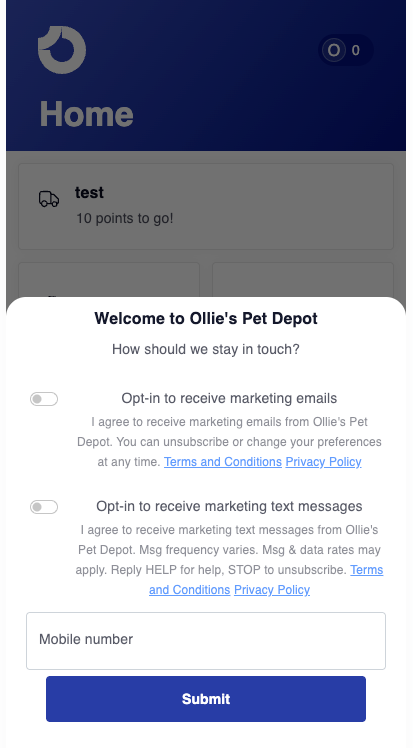
To turn the block on and edit the text:
- Go to Customer experience › Customer portal
- Use the drop-down and select the Marketing consent pop-up
- Edit the text.
- Click Save.
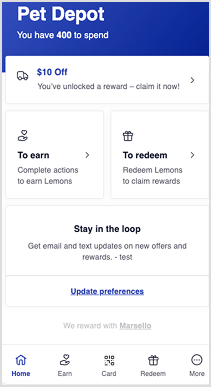
A Stay in the loop block now appears on the customer portal home page, linking to the customer's marketing preferences. It's a gentle prompt for customers to opt in.
To edit the text or turn the block off:
- Go to Customer portal content › Home page components.
- Select the Stay in the loop block.
Signup forms
🏷️ Signup forms are unlocked with the Marketing add-on.
What's changed: Previously, your customers were notified that their marketing consent was collected when signup forms were submitted. Now, signup forms have separate email and SMS checkboxes for your customers to explicitly opt in.
This applies to pop-up forms, landing page forms, link in bio and POS check-in forms.
⚠️ Important:
- Any new forms you create include the checkboxes and disclosure automatically.
- Next time you update an existing (live) forms, you will be prompted to add a consent checkbox and disclosure text.
Add consent checkboxes to an existing form
Steps:
- In Marsello, open the form you want to update.
- Click on the form block.
- Under fields, use the dropdown to select the checkbox fields.
- If your form collects an email address, add the Opt-in to receive marketing emails checkbox. This fills your current disclosure wording and policy links.
- If your form collects a mobile number, add the Opt-in to receive marketing text messages checkbox. This fills your current disclosure wording and policy links.
- Preview the form.
- Click Save (or Publish).
📝 Note: The Terms and Conditions / Privacy Policy links from your disclosure text will be clickable on the live form.
Merge tags you'll use:
- [Merge tag name]
[]: [what it inserts, e.g. email consent checkbox] - [Merge tag name]
[]: [what it inserts, e.g. SMS consent checkbox] - [Merge tag name]
[]: [what it inserts, e.g. disclosure text with your Privacy Policy and T&Cs links]
Steps:
- [Step placeholder: go to Marketing › Signup forms and open the form you want to update]
- [Step placeholder: remove the old combined disclaimer text block, if your form has one]
- [Step placeholder: add the email consent checkbox]
- [Step placeholder: add the SMS consent checkbox. Make sure the form has a phone number field]
- [Step placeholder: add the disclosure merge tag below the checkboxes]
- [Step placeholder: preview the form and check the checkboxes are unticked]
- [Step placeholder: click Save / Publish]
[Screenshot placeholder: updated form with email and SMS checkboxes and disclosure text]
📝 Note: [Placeholder: any limits, e.g. which form types support the merge tags, or what happens to submissions made before the form is updated.]
Disclaimer: The information provided here is intended to be educational and should not be construed as legal advice. Marsello encourages all of our users, and all merchants, to seek legal advice on how they specifically should prepare for GDPR, TCPA, CASL and other applicable privacy and marketing laws.