
Why Didn't My Customer Receive the Marketing Messages? Troubleshooting Guide for Campaigns
If a customer isn't receiving your marketing messages, there are a few common causes to check. Email marketing campaigns and automations are unlocked with the Marketing add-on. This guide covers your sales platform connection, domain authentication, the customer's marketing status and your marketing opt-in settings.
🏷️ Email marketing campaigns and automations are unlocked with the Marketing add-on.
Before you get started
- Have the customer’s name or email address ready, so you can find them in Customers > All Customers.
- Check the App Status page to rule out an outage first.
Is your sales platform connected to Marsello?
To ensure your customers' "accepts marketing" status syncs correctly with Marsello, your sales platform must be connected. Marsello uses the status from your sales platform as the source of truth for determining whether a customer accepts marketing. Marsello relies on Shopify as the primary source of truth for marketing consent status. Discrepancies can occur if Klaviyo shows a customer as subscribed but Shopify does not, leading to Marsello not recognising the customer as subscribed.
How to check
- Go to Settings > Integrations > Sales Platform and check whether your sales platform is connected to Marsello.
How to fix
- If your sales platform is not connected, click Connect Sales Platform to complete the setup.
Once your sales platform is connected, your customers' "accepts marketing" status syncs with Marsello. [CHECK: how long the sync takes, if there's a delay]
📝 Note: Please check the Sales platforms section of our help centre for more detailed help with individual integrations.
Is your domain authenticated?
Domain authentication confirms that your emails are sent from an authorised domain, helping improve email deliverability and build trust with inbox providers.
How to check
-
Go to Settings > Compliance > Email Domains.
-
If your domain is authenticated, you’ll see an Authenticated status displayed on the page.

How to fix
- If your domain is not authenticated, we strongly recommend authenticating your domain for your business. This help centre guide walks you through the required setup.
Once domain authentication is complete, your Campaigns, Automations and Loyalty Notification emails are sent from your own email domain. [CHECK: how long authentication takes, if there's a delay]
Without domain authentication, your emails are more likely to be marked as spam or not delivered, which can reduce how many customers see them.
Does your customer accept marketing?
If a customer isn’t receiving marketing messages, their "accepts marketing" status might be set to "does not accept marketing."
📝 Note: A customer accepts email marketing in Marsello when both of these are true:
- They have a contactable email address. The address is correctly formatted and hasn't hard bounced, been marked as spam, or unsubscribed.
- Their marketing opt-in preference is "Yes." This preference can be set via [POS profile sync / eCommerce profile sync / signup form / customer profile update].
If either condition isn't met, the customer does not accept email marketing and won't receive marketing emails.
How to check
-
Navigate to Customers > All Customers and search for the customer by name

-
Open the customer's loyalty account and scroll to the Marketing section. Here, you can view the customer's Email marketing status and SMS marketing status.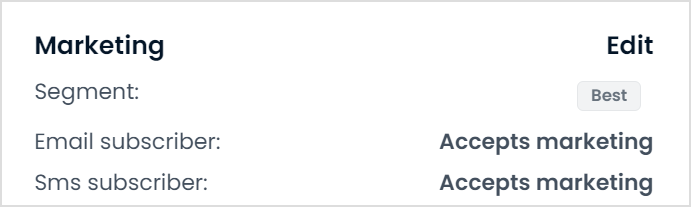
📝 Note: If the customer's marketing status shows doesn't accept marketing, the customer will not be sent any marketing emails from Marsello.
-
If the customer's marketing status is listed as "does not accept marketing," verify that this matches the status in your sales platform.
- Mismatch in status: If your sales platform shows "accepts marketing" but Marsello shows "does not accept marketing," contact our support team for assistance. They can resync the marketing statuses for your account.
- Klaviyo and Shopify mismatch: Sync issues between Klaviyo and Shopify can also cause mismatches. Make sure Klaviyo's sync to Shopify is successful, because Marsello retrieves marketing preferences directly from Shopify.
- Matching status: If the status in your sales platform also shows "does not accept marketing," the customer will not receive marketing messages.
How to fix
If the customer provides written consent to receive marketing messages:
- Update the customer's status in your sales platform. This update syncs with Marsello automatically.
- If the consent is recent, make sure the customer is opted back into marketing campaigns in Marsello. This re-enables email delivery for campaigns and automations.
You can also update the customer's preferences through the Customer Portal or Marketing Preferences in Marsello:
- Go to the customer profile.
- Select Customer Actions.
- Choose the appropriate option to update the customer's marketing preferences.
[CHECK: what the merchant should see once the customer is opted back in, and how long the sync takes]
Is your customer subscribed to transactional messages only?
Your Marsello dashboard has an optional setting to send transactional emails only to customers who accept marketing.
How to check
-
Navigate to Settings > Email Marketing > Compliance
-
Scroll to the Marketing Opt-in Details section and check the setting labeled Only send transactional messages to customers who have opted in to marketing.

- If the on/off toggle is switched on, customers who accept marketing will only be sent transactional messages.
- If the on/off toggle is switched off, customers who accept marketing will receive marketing messages.
How to fix
[CHECK: steps to change the Only send transactional messages to customers who have opted in to marketing setting, and what the merchant should see once it's fixed]
Do your Marsello marketing opt-in settings require customers to accept marketing at all connected sales platforms?
Your Marsello dashboard has an optional setting that prevents marketing messages from being sent unless the customer accepts marketing at all connected sites.
How to check
-
Scroll to the Marketing Opt-in Details section
-
Check the setting labeled Only send marketing messages to customers who accept marketing at all connected integrations.

-
If the on/off toggle is switched on, customers must accept marketing at all connected sales platforms in order to receive your marketing messages
-
If the on/off toggle is switched off, customers must accept marketing at least one connected sales platform in order to receive your marketing messages.
Still not working?
If your customer is still not receiving marketing messages after you have checked your sales platform connection, domain authentication, the customer’s marketing status and your marketing opt-in settings, contact Marsello support. When you contact us, include:
- The customer’s name and email address.
- The customer’s marketing status in Marsello and in your sales platform.
- A screenshot of the Marketing section in the customer’s loyalty account.
Contact our support team through How to contact Marsello support.