
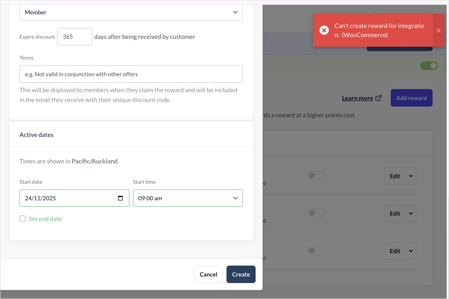
For WooCommerce brands, you may see an error message when you try to create a reward in Marsello. This guide shows you how to fix it for your customers.
Applies to: WooCommerce
This guide is specific to the WooCommerce integration.
🏷️ Loyalty rewards are available on all Marsello plans.
Before you get started
-
Make sure you can log in to your WooCommerce dashboard.
-
Note the exact error message you see, for example "Can't create reward for integration : (WooCommerce)".
-
Check App Status to rule out an outage first.
Are coupons turned on in your WooCommerce dashboard?
If you see the error message "Can't create reward for integration : (WooCommerce)", you may need to update your coupon settings in WooCommerce.
How to check
-
In your WooCommerce dashboard, go to Settings > General > Enable coupons.
-
Check whether the option to “Enable the use of coupon codes” is selected.
How to fix
-
Ensure the option to “Enable the use of coupon codes” is selected.

Still not working?
If the error message still shows after you turn on these settings in your WooCommerce dashboard, please contact our support team. See How to contact Marsello support.
When you contact support, include:
-
The exact error message you see.
-
Screenshots of the error.