-1.svg)
Cin7 Omni: Capture customer email and SMS marketing consent at POS
How staff record a customer's email and SMS marketing consent at Cin7 Omni POS using the separate email and SMS opt-in toggles in the Marsello Chrome extension, for new and existing customers.
Updated: September 29, 2026This guide is specific to the Cin7 Omni POS integration.
Capture your customers' marketing opt-in preferences
When a new customer makes an in-store purchase, it’s important that staff ask whether they’d like to join your database and receive marketing via email and SMS. Permission is required by International Law (including GDPR, TCPA, TCIA & CCPA) and our Terms of Use.
Capturing marketing consent (opt-in) means:
-
If you already use Marketing or SMS add-ons → you can immediately send campaigns and automations to those opted-in customers.
-
If you don’t yet use Marketing or SMS add-ons → you’ll be building your list now, so when you decide to upgrade, you’ll have a database ready to go from day one.
⚠️ Important: Opt-in is required
Customers are not subscribed to marketing by default. Staff must ask each customer about email and SMS separately, and record each answer with its own toggle.
Marsello stores these preferences. They are not written back to the customer in Cin7 Omni.
Before you get started
Here are some key details to know about customer opt-in for marketing messages:
Collecting SMS & Email Subscribers
-
Staff record consent in the Marsello Chrome extension using two separate toggles:
- Opt-in to receive marketing emails
- Opt-in to receive marketing text messages
-
Turn on only the channels the customer agrees to. A customer can opt in to email, SMS, both, or neither.
Age Restrictions
-
The TCIA prohibits any unlawful or inappropriate promotions to individuals under 18 years of age.
-
Based on your industry and community standards, you must discourage underage visitors from creating accounts or subscribing to your marketing programs.
Opt-Out Options
-
Customers must always be able to opt out of marketing. Marsello provides this by default:
-
Email: an unsubscribe link is included in every template.
-
SMS: customers can reply STOP to unsubscribe.
-
Legal Compliance
-
Marketing laws vary by region. We recommend consulting a legal advisor familiar with GDPR, TCPA, and TCIA before collecting customer data or sending promotional messages.
Staff Training Requirements
-
As covered in the SMS Marketing Compliance Introduction and GDPR Introduction, your team will need updated training on how to correctly sign up new customers via Cin7 Omni while ensuring proper consent collection.
We also still encourage you to consult a legal advisor familiar with GDPR, TCPA and TCIA before gathering contacts or sending promotional emails or text messages.
How do customers opt in to marketing through Marsello sign-up forms?
Marsello sign-up forms (pop-up, landing page, link in bio and POS check-in forms) have separate checkboxes for email and SMS marketing, each with disclosure text. Submitting a form doesn’t subscribe a customer on its own. They must tick the checkbox for each channel they want to receive.
Default disclosure text:
-
Email: I agree to receive marketing emails from [Business Name]. You can unsubscribe or change your preferences at any time. [Terms and Conditions] [Privacy Policy].
-
SMS: I agree to receive marketing text messages from [Business Name]. Consent is not a condition of purchase. Msg frequency varies. Msg & data rates may apply. Reply HELP for help, STOP to unsubscribe. [Terms and Conditions] [Privacy Policy].
You can edit this text and add your Privacy Policy and Terms & Conditions links in Settings › Compliance › Marketing compliance.
⚠️ Important: If you are using another app for sign-up forms, you need to update your forms to include separate email and SMS opt-in checkboxes, with disclosure text that tells the customer what they’re agreeing to for each channel.
📝 Note: Customers are always in control of their marketing preferences and can opt-out at any time. All promotional messages sent through Marsello include an unsubscribe link, allowing customers to opt out whenever they choose. Alternatively, customers can request to opt out in-store at checkout or manage their preferences online through the Marsello Customer Portal.
How do I capture customer marketing opt-in preferences in Cin7 Omni?
⚠️ Important: Ensure that the following installation has been completed:
-
Your POS sites are enabled under the Integrations page
-
You are using Google Chrome browser to access Cin7 Omni POS
-
You have installed the Marsello Chrome Extension on every desktop you use to access the Cin7 Omni POS in-store.
-
By default, customers do not accept marketing, and they must opt-in to receive marketing through Marsello.
As outlined in the Marketing Compliance Introduction, customers must give express written consent before receiving marketing emails or SMS.
When processing an in-store purchase, staff should ask if the customer wants to join the store’s database and receive marketing via email and SMS. Staff can record the customer’s marketing preferences by following these steps:
For new customers
1. In the sale screen's Customer section, click New.
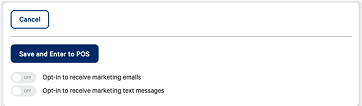
2. On the New Customer page, below Save and Enter to POS, set each toggle to match the customer's answer:
- Opt-in to receive marketing emails: On if the customer agrees to marketing emails.
- Opt-in to receive marketing text messages: On if the customer agrees to marketing SMS. Make sure you've entered their mobile number.
3. Leave a toggle Off if the customer hasn't agreed to that channel.
5. Add the products to the sale, then complete the sale. The customer's details, email marketing preference, sms marketing preference and sale sync to Marsello.
For existing customers
1. Add the customer to the sale
2. Click the Check Rewards button
3. In the customer's loyalty profile, below their name and VIP tier, set each toggle to match the customer's answer:
- Opt-in to receive marketing emails
- Opt-in to receive marketing text messages
On means the customer has agreed to that channel. Off means they haven't.
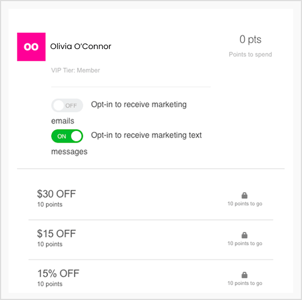
💡 Tip: To opt a customer out, turn the relevant toggle Off.
4. Click Return to sale.
5. Complete the sale. The customer's details, email marketing preference, SMS marketing preference, and sale sync to Marsello.
What is the customer experience with marketing opt-ins?
In-store at POS
During checkout, staff ask the customer about email and SMS marketing separately, then set the Opt-in to receive marketing emails and Opt-in to receive marketing text messages toggles before completing the sale.
The customer's details and marketing preferences appear in Marsello within about 10 minutes. Marsello matches customers by email address, so always capture an email. If the customer opts in to SMS, you must also capture their mobile number.
In Marsello's Customer portal
Signing up to the Customer Portal collects the customer’s email address only. It doesn’t subscribe them to marketing. The first time a customer signs in, a pop-up asks whether they’d like to receive marketing, with a separate checkbox for email and SMS.
After creating a Cin7 Omni store account, customers can update their marketing preferences at any time through Marsello’s Customer Portal.
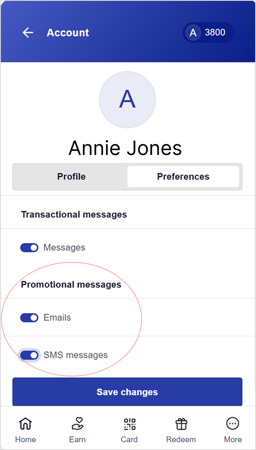
To opt in to email, SMS or both, toggle the corresponding switch under Promotional Messages to On.
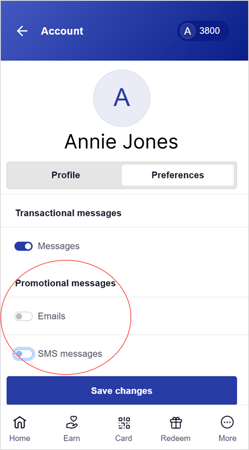
To opt out of email, SMS, or both, toggle the corresponding switch to Off.
What's next?
As your subscriber list begins to grow, you can create marketing campaigns to help increase sales and further drive customer loyalty.
Marketing initiatives:
-
Send an email campaign
Disclaimer: The information provided here is intended to be educational and should not be construed as legal advice. Marsello encourages all of our users — and all brands – to seek legal advice for counsel on how they specifically should prepare for GDPR, TCPA and TCIA.