-1.svg)
Explore the loyalty automations in Marsello to reward customers, boost engagement, and drive more repeat purchases.
Loyalty automation are a great way to keep customers informed about their loyalty points and available rewards. These emails are also a great way to keep in touch with your customer base and encourage them to come back in-store. This article will also explore how loyalty automation differs from Marsello's marketing automation system and the benefits of their integration.
Loyalty automation currently available in Marsello include:
-
Earned points automation
-
Reward unlocked automation
-
Reward discounts automation
-
Referral discount automation
-
Say happy birthday automation
-
Points expiry automation (unlocked on the Loyalty Accelerate plan)
-
VIP tier entry automation (unlocked on the Loyalty Accelerate plan)
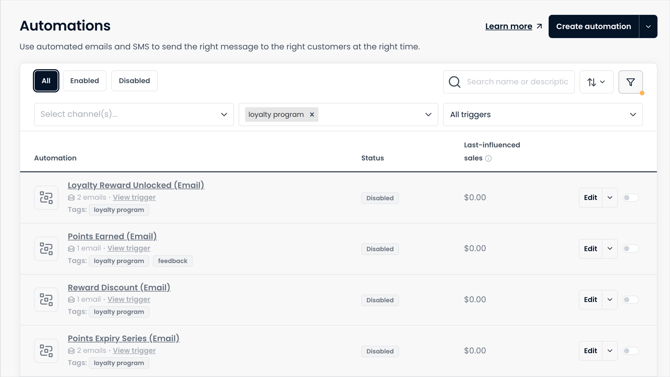

Types of loyalty automation available in Marsello
Earned points automation
🏷️ The Earned Points automation is available on all Marsello plans.
Customization features are unlocked with the Marketing add-on.
Notify customers automatically (either by email or SMS) each time they earn points. When this automation is enabled, customers will receive an email each time they earn points for purchases and complete any earn options set in your loyalty program, for example, social sharing and referring friends. The email will let them know how many points they have just earned and for what action, their current points balance, and how close they are to their next reward.
Reward unlocked automation
🏷️ The Reward Unlocked automation is available on all Marsello plans.
Customization features are unlocked with the Marketing add-on.
Automatically notify customers (by email or SMS) once they have earned enough points to spend on a reward. This automation will let customers know which reward they are eligible to use and will allow them to click through the widget to view and redeem the reward with their points.
Reward discount automation
🏷️ The Reward Discount automation is available on all Marsello plans.
Customization features are unlocked with the Marketing add-on.
Automatically send customers their unique discount code (either by email or SMS) so they can save it for reference later when they are ready to purchase.
Referral discount email
🏷️ The Referral Discount automation is available on all Marsello plans.
Customization features are unlocked with the Marketing add-on.
If you reward customers for referring friends, this automation sends the referred friend their reward. When a customer refers a friend and that friend joins your loyalty program, the friend receives their unique discount code so they can use it on their first purchase.
Say happy birthday automation
Automatically send customers a birthday message on their birthday, helping you build stronger relationships with a thoughtful, timely touch.
Points expiry automation
🏷️ The points expiry automation is unlocked on the Loyalty Accelerate plan.
If you have enabled the points expiry feature, you can automatically notify the customer that their points will soon expire. This email notification is a great way to encourage loyalty program engagement and urgency by reminding customers of their existing points balance before it's gone.
VIP tier entry
🏷️ The VIP tier entry automation is unlocked on the Loyalty Accelerate plan.
VIP tiers recognize customers for their long-term loyalty and engagement, allowing them to unlock exclusive, tier-specific benefits that go beyond single-use rewards. By entering a higher loyalty tier, customers achieve elevated status and gain access to ongoing perks tailored to their tier level.
If you have created a loyalty-tiered loyalty program, when a customer has earned enough points to enter a higher loyalty tier, you can automatically notify that customer by email. This email lets them know what tier they have just entered and how many points they will now earn for every $ they spend.

How to set your enable loyalty automation
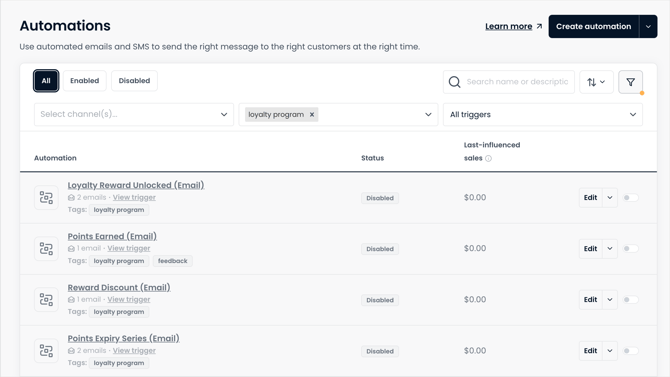
1. In your Marsello admin, go to Loyalty > Automations.
2. Click on the edit button next to the automation you wish to customize and make any required edits so the automation better suits your brand.
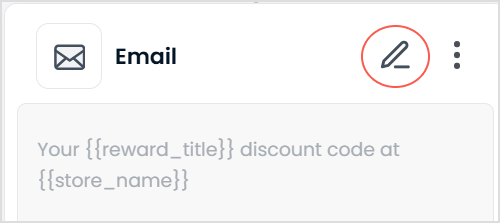
3. Click on the pencil icon to edit any of the settings for the preset individual email messages.
4. This will open a form which will allow you to update the email settings (including subject line). Update the email settings, including the subject line, then click Edit email to open your email template.
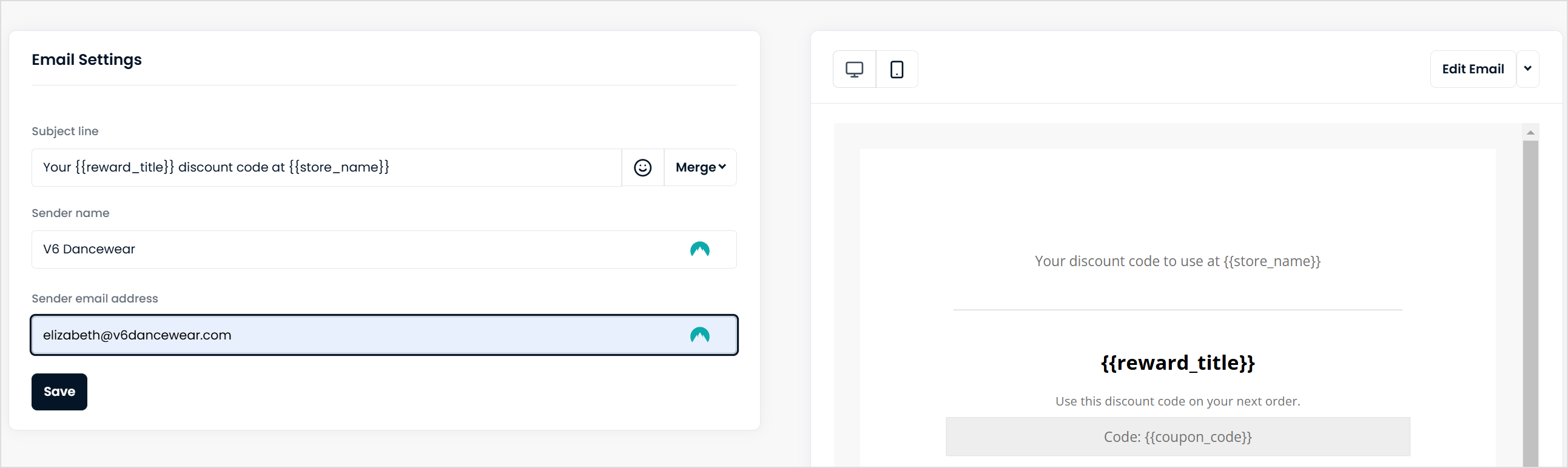
5. Click Edit email on the Email settings menu to open your email template.
6. This will open your email template. Here you can edit your email message, adding your store's voice and tone to your loyalty emails.
7. If you'd like to add an additional email, a delay, or even an SMS step into the flow, select the {+} icon in the flow to add the step.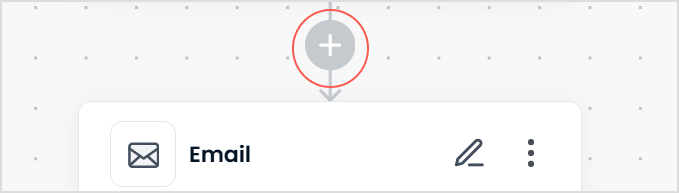
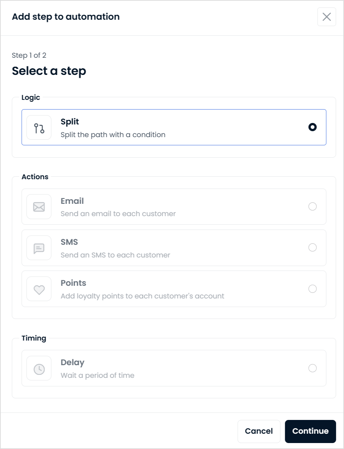
8. Click on the pencil icon as in steps 3-5 to customize this new step.
📝 Note: Adding an SMS step into the flow requires a current subscription to Marsello SMS. Click here to learn more about Marsello's SMS feature.
9. Once you are happy with your updates, click Enable Automation. The automation will begin sending to customers who meet this automation's trigger.
FAQs
Q. Do customers who haven't accepted marketing still get loyalty automations?
A. Yes, for transactional automations. The first message goes to all contactable customers. Later message steps need marketing consent on their channel. If you turn on Only send transactional messages to opted-in customers, only customers who accept marketing receive any loyalty automation.
Q. Why didn't my customer receive their birthday message?
A. Say happy birthday is a marketing automation. The customer must accept marketing on that step's channel (email or SMS). Check their email and SMS marketing consent on their customer profile.
Q. Why did my customer get the first message but not the rest of the flow?
A. Message steps after the first one are marketing steps. If the customer hasn't accepted marketing on a step's channel, the flow stops for them at that step.
Q. Why didn't my customer get points from a Points step in my flow?
A. If the Points step comes after a message step, the customer only gets the points if they reach it. If the flow stopped at an earlier step they couldn't receive, the Points step doesn't run. To give points to everyone who enters, put the Points step before the first message.
Q. Why is the enable estimate lower than my total customer count?
A. The estimate only counts customers who can receive the flow's channels. Email-only flows count email consent, SMS-only flows count SMS consent, and mixed flows count either.
Q. Will customers receive a notification email if Points/Rewards/Tier status is updated manually?
A. If the customer has been manually moved to Tier or provided a reward, they will not receive notifications as it was done through the admin. For Points adjustment, these are optional.
Q. Can loyalty notifications be sent as automation and an SMS?
A. Yes, loyalty notifications are moving to automation. They will appear in both the automation and notifications for now. These can also be sent as an SMS.
Q. Now that my loyalty automations are enabled, what should I do with my loyalty notification emails?
A. Merchants who signed up before 2023 may see a tab in their Marsello app admin for loyalty notifications. This is here as a reference to the loyalty emails you were previously sending. Please do not enable as this feature is no longer being updated. Loyalty automations give you more control—you can customize templates, triggers, flows, and exit conditions. Plus, you get reporting to track how well your automations are performing.
Q. Does the earned points loyalty automation pull the loyalty points earned based on the order's subtotal or the actual points awarded?
A. The earned points loyalty automation will display the loyalty points awarded from the actual order.
Q. Can you send me a notification each time a loyalty reward claimed and a loyalty reward redeemed automation goes out?
A. Currently, there isn't a feature that will notify you each time a loyalty reward is claimed and redeemed. If this is a feature you'd like to see, please reach out to our support team and let them know of your interest. Please note that a record of each claimed and redeemed reward can be found in your Marsello dashboard under each individual reward.
Q. What happens if I enable my loyalty automations but haven't yet enabled my loyalty program?
A. It is recommended to enable your loyalty automation after you have enabled your loyalty program. This is to ensure an automation doesn't automatically go out to a customer meeting the automation's trigger criteria to send.
Q. Will my earned points loyalty automation send to a customer when I manually update their points?
A. If you manually adjust a customer's loyalty points balance, the earned points loyalty automation will not send by default. However, if you'd like the customer to receive this automation, be sure to select the checkbox that reads "Send points notification email to customer?" under the points adjustment field.
Q. Where can I find my loyalty email automation in Marsello?
A. Your loyalty automations can be found inyour Marsello dashboard under Loyalty > Automations.
Brands also searched for notifications, notic, notif, auot, automationemail, loyr