
Applies to: Lightspeed Restaurant O-Series
This guide is specific to the Lightspeed Restaurant O-Series integration.
For Lightspeed Restaurant O-Series brands, you can quickly and easily sign customers up to become loyalty members, also called joining or registering, both in-store at checkout and outside your store with a QR code.
September 19, 2025
How do I sign up loyalty members at checkout in Lightspeed Restaurant O-Series?
-
For Lightspeed Restaurant O-Series brands, staff first add the customer's items to their transaction at the POS.

-
Staff ask the customer to join your loyalty program.
-
When the customer accepts the verbal invitation, staff create a customer profile with the customer's name and mobile number.
-
Staff assign the customer to the sale.
-
Staff finish processing the transaction as normal.

How do I sign up loyalty members with a QR code in Lightspeed Restaurant O-Series?
For Lightspeed Restaurant O-Series brands, when you are out of store, such as at a pop-up event, you can sign new customers up with a QR code instead of at checkout. You can create a QR code that customers scan to go straight to the signup form. Once the customer completes the signup form, a profile is also created for them in the Lightspeed POS database.
⚠️ Important:
-
If your business uses Bopple’s ‘table ordering’, you don't need to use the QR code sign up forms. You may still find QR code sign up forms useful for outside events, like catering jobs.
-
If your business has Lightspeed Ordering powered by Bopple or an integrated Shopify website, the QR codes can be set up to direct customers to sign up there instead.

How does new customer SMS registration work in Lightspeed Restaurant O-Series?
🏷️ SMS automations are unlocked with the SMS add-on.
-
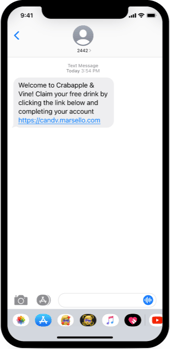
For Lightspeed Restaurant O-Series brands with the SMS add-on, after the customer is added to the sale, the customer receives an SMS asking them to complete their account.
-
By default, the link in the SMS takes customers to the customer portal to sign up.

The customer can now sign up via one of the single-sign-on options and access their customer portal.

Your customers' experience
-
For Lightspeed Restaurant O-Series brands, customers can use the in-store customer portal to access their digital membership card, loyalty points balance, available rewards and email discounts. Customers can also earn points in the in-store customer portal by completing actions like referring a friend.
-
Customers can access this portal through any web browser and can bookmark or save it to their smartphone home screen for easy access when visiting you in the future.
-
Loyalty notifications from Marsello can lead either to this portal, to Bopple, or to your Shopify eCommerce site (if applicable).