-1.svg)
Create a % off reward to give store credit that customers can use on any purchase at your store.
✨ Percentage (%) off loyalty reward - A percentage (%) off discount that is a set amount off the customer's entire order.
🏷️ Storewide loyalty rewards are available on all Marsello pricing plans.
Reward type is available for all POS and eCommerce integrations.
Let customers earn store credit they can spend on anything, giving them freedom to choose their rewards.
How do I create a storewide % off reward?
1. In your Marsello admin, go to Loyalty > Points program > Redeeming and click Add Reward.
2. This will open a popup form where you can add the details of your reward. Please complete the following:
-
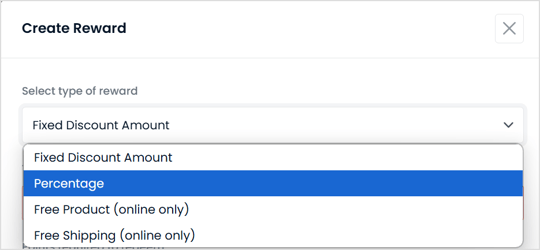
Reward Type: click Percentage in the drop-down
-
Reward Title: Give your reward a title that lets your customers know what the reward is

-
Points cost: enter the number of points a customer needs to spend to redeem your reward

-
Discount amount: enter the reward % discount amount. Make sure it matches the discount specified in the title

3. Go to the Advanced Options menu. Under Expiry, tiers and terms add any terms that you want your customers to abide by when using this reward. Here are some examples of terms to include with your loyalty rewards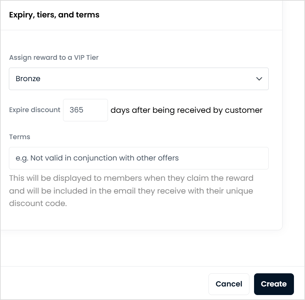


Brands also searched for: voucher, in0s, icount, rreward, rrew, {{reward_title}}, {{reward_title}, {{reward_title, {reward_title}, reward_title}, reward title, reedim,unredeem, unreedee, reedimg