-1.svg)
How do I award loyalty points for in-store purchases using Lightspeed Retail (R-Series) POS?
Earn loyalty points in Lightspeed R-Series by adding the customer to the sale. Points apply automatically when the sale is completed.
April 2, 2026
Applies to: Lightspeed Retail (R-Series) POS
This guide is specific to the Lightspeed Retail (R-Series) POS integration.
Award loyalty points for in-store purchases
To award loyalty points for in-store purchases, you must attach the customer to the sale in Lightspeed Retail POS (R-Series).
⚠️ Important: To ensure Marsello Loyalty works correctly with Lightspeed Retail (R-Series), you need to ensure that Lightspeed Loyalty is disabled.
Once a customer is attached to a sale and the transaction is completed in Lightspeed Retail (R-Series) POS, Marsello will automatically award loyalty points.
Step-by-Step: Add a Customer to a Sale
1. Add the products to the sale in Lightspeed POS.
2. Search for the customer using their name, email, or mobile number
3. Once you have found the customer's account, click + Attach to sale

4. Complete the sale.
The customer will automatically receive their loyalty points after the sale is completed.
💡Tip: If the customer is not in your database, select +Add Customer instead of searching for their account to create their profile before completing the sale.Your Customers’ Experience.
New Customers
When a sale is completed:
-
The customer is automatically added to your Marsello customer database
-
They are enrolled in your loyalty program
-
They instantly earn loyalty points for their purchase
If enabled, the customer will also receive:
-
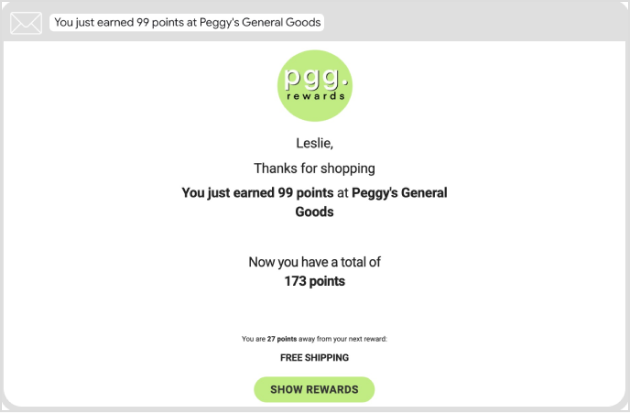
A Points Earned email showing:
-
Points earned
-
Updated balance
-
Points needed for the next reward
-
-
A Welcome email (if your welcome automation is active), introducing their account and rewards
If the customer opts in to marketing, they will also be eligible to receive future campaigns and automations.
Existing Customers
When a sale is completed:
-
The customer automatically earns loyalty points
-
If enabled, they receive a Points Earned email with:
-
Points earned from the purchase
-
Updated points balance
-
Progress toward their next reward
-
Points earned email example
What's next?
Brands also searched for: in0s, tran, redde