-1.svg)
Why are customers opting out of Marsello emails?
Customers can update their email preferences and unsubscribe from any email sent from Marsello.
April 14, 2026
This guide explains how customers can unsubscribe from loyalty and marketing emails sent through Marsello, what happens in your account when they do, and how unsubscribe settings sync with platforms like Shopify.
How do customers unsubscribe from your emails?
If a customer no longer wants to receive your loyalty notifications or marketing emails, they can unsubscribe at any time using the link included in every email sent via Marsello.
How does the unsubscribe link work?
All emails sent through Marsello include an unsubscribe link at the bottom of the email.
This link is powered by the ## merge tag in your email template.
When a customer clicks Unsubscribe, they’re taken to their Email Preference Settings page where they can choose what types of emails they want to stop receiving.
They can unsubscribe from:
-
Loyalty program emails
-
Email marketing
-
Or both
After making their selection, they click Save Preferences to confirm.
What happens in Marsello if the customer unsubscribes from Loyalty Program Emails
-
They will no longer receive loyalty emails.
-
This includes reward notifications and other loyalty-related communications.
-
They will still receive marketing emails (unless they unsubscribe from those too).
What happens in Marsello if the customer unsubscribes from Email Marketing
-
Their Accepts Marketing status in Marsello is updated to No.
-
They will no longer receive marketing campaigns sent via Marsello.
📖 Learn more: How to manually unsubscribe a customer in the Marsello admin.
⚠️ Important: When a customer unsubscribes from an email in Marsello, their marketing status is not automatically updated in your POS or eCommerce platform.
Shopify Exception
If your store is connected to Shopify, this works slightly differently.
When a customer unsubscribes from marketing emails in Marsello:
-
Shopify requires their profile to be updated to Does not accept marketing.
-
Marsello will automatically sync this update to Shopify.
This is required by Shopify to ensure compliance with their marketing rules.
How this works – your customers' experience
If the customer receives an email sent via Marsello, they will be able to see the unsubscribe link at the bottom of the email.

If they click the unsubscribe, this will open the Email Preference settings page. Here the customer can choose to unsubscribe from your loyalty program and/or marketing emails. Then, click Save Preferences to save their updated unsubscribe settings.
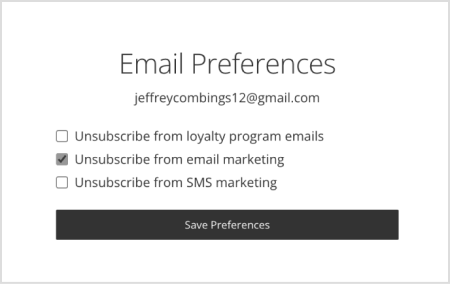
Marsello will no longer send loyalty program emails and/or marketing emails to this customer.
FAQs
Q. Can I access a full list of customers who have unsubscribed?
A. No, you can’t access a complete unsubscribe list across all campaigns right now. Unsubscribes can only be viewed on a per campaign basis.
As a workaround, go to your campaign reporting, open the Unsubscribed tab, and export the list for that specific campaign. If this is something you'd like to see added, feel free to vote for this feature. Your feedback goes directly to our product team and helps us prioritize what’s most important to you!
Q. If a customer only wants to stop receiving the Abandoned Cart email, should they unsubscribe from Loyalty Program Emails or Email Marketing?
A. The Abandoned Cart email is considered a transactional loyalty email.
If a customer unsubscribes from Loyalty Program Emails, they will stop receiving all loyalty emails — not just the abandoned cart email.
If the customer would like to:
-
Continue receiving other loyalty notifications
-
But stop receiving abandoned cart emails only
You can update your automation instead.
Add a conditional split at the very beginning of your Abandoned Cart flow using the condition:
Email is not [customer email]
Placing this condition at the start of the automation prevents that customer from entering the abandoned cart flow again in the future, without unsubscribing them from all loyalty emails.
Brands also searched for: ubsu, ubsub, unsub, undubscribe, eamil, csut, unsubscription, ubsubscribe, ubsubscrib