
Measure Klaviyo campaign impact on in-store & online sales with Marsello order data so you can pinpoint the most impactful marketing tactics
March 14, 2026
🏷️Omnichannel offers for Klaviyo are unlocked on the
Loyalty Accelerate plan.
Marsello and Klaviyo work seamlessly together to empower you in crafting targeted marketing campaigns for your customers.
By leveraging the loyalty program, customers are incentivized to provide their information at the point of sale (POS), including their name, email address, and/or mobile number. This order and customer data is then synced in real-time into Klaviyo, allowing you to send personalized marketing communications to segmented customer groups.
🎥 See demo video:
Klaviyo and Marsello merchants can:
✨ Utilize loyalty program and in-store order data for personalized customer segments.
✨ Supercharge Klaviyo email campaigns and automations with customer loyalty information, along with offering redeemable incentives for both in-store and online.
✨ Keep accounts in sync with real-time data, enabling you to manage marketing using the latest insights from your in-store and online channels.
✨ View in-depth reporting on in-store and online sales from their campaigns efforts in Klaviyo.
Follow this guide to use your Marsello order data to build a Klaviyo omnichannel sales report (a custom campaign performance report). The report measures the impact of your Klaviyo email and/or SMS campaigns on in-store sales, so you can identify effective marketing strategies for your physical stores.
Before you get started
Please ensure that you've set up the Marsello x Klaviyo integration correctly:
-
You've created a private API Full Access Key (see more information)
-
You've connected Marsello to Klaviyo in the Extensions section.
-
You've enabled the "Sync POS orders" setting (required). To also measure your eCommerce sales, enable "Sync eCommerce orders" (optional).
📖 Learn more: How to set-up the Klaviyo Integration.
👉 Not using Klaviyo? Discover more about Klaviyo's features and benefits here.
Create a Klaviyo campaign performance report
In your Klaviyo account:
-
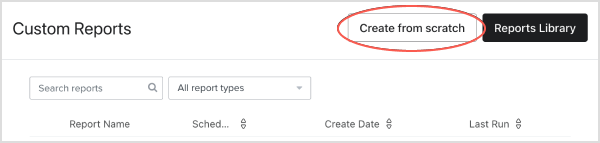
Go to Analytics > Custom Reports.
-
Click Create from Scratch
-
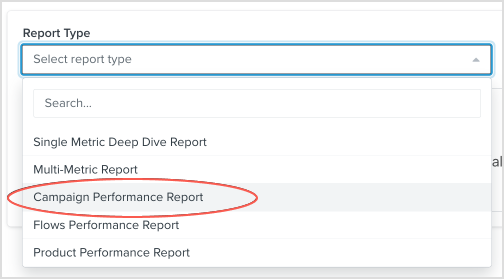
Under Report Type, select Campaign Performance Report from the dropdown.
-
Give your report a name e.g. "In-Store Sales Report: Leveraging Marsello Data"
Add Marsello order data to your Klaviyo campaign performance report
To measure your Klaviyo campaign's impact on in-store sales accurately, you'll need to select the Marsello order data points. Your Klaviyo report comes with Klaviyo's standard deliverability and engagement metrics by default, and you can tailor it to meet your business requirements.
-
Review the Standard Campaign Metrics. Add or remove any campaign delivery and engagement metrics to suit your business.
-
Under Conversion Metric, click + Add Conversion Metric
-
Search "Marsello" in the search bar, then select Marsello - placed order
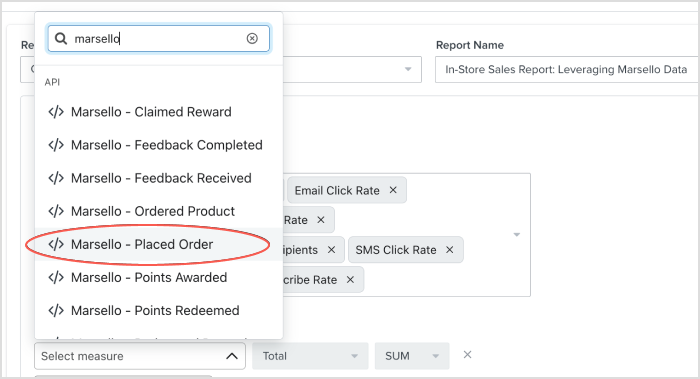
📝 Note: When you sync both "POS orders" and "eCommerce orders" from your Marsello account, the "Marsello - Placed order" metric includes all POS and eCommerce orders within your chosen time frame.
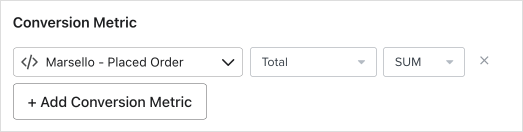
By default, the condition and value are already set to the correct settings: Total and SUM.
-
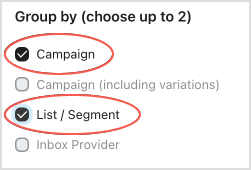
Under Group by (choose up to 2), select Campaign (and List / Segment is optional)
-
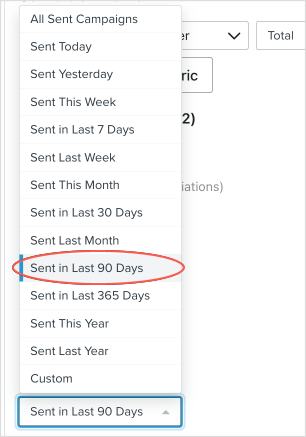
Under Timeframe, select your preferred timeframe, e.g. Sent in Last 90 Days
💡 Tip: If you haven't already, you can sync data from the past six months into your Klaviyo account in your Marsello settings. This lets you analyze your Klaviyo campaigns from before you connected Klaviyo and Marsello.

-
Click Save & Run Report. This will process your report and save it in your account.
👉 Klaviyo support article indicates: "While it may take some time to populate your results, when it is complete you will see a robust summary of your report. Your new report and its results will automatically be saved, so you may navigate away and return to your report from within the Analytics tab at any time."
Using your new custom report you'll now be able to leverage your Marsello order data to measure Klaviyo campaign impact on in-store sales, to identify effective marketing strategies for your physical stores 🎉
🎓 Want to learn more about Klaviyo custom reports?
Klaviyo help center has a comprehensive article on creating custom reports for campaigns 👉 How to build a campaign performance report.