-1.svg)
Connect Lightspeed Restaurant (O-Series) POS to Marsello
Step-by-step guide to connect Marsello and Lightspeed Restaurant (O-Series) POS.
By integrating your loyalty program with your Lightspeed Restaurant (O-Series) point-of-sale platform, you can capture data on customer purchases, preferences, and behavior. This enables you to foster customer relationships and pinpoint valuable opportunities for targeted marketing to grow sales.
Applies to: Lightspeed Restaurant O-Series
This guide is specific to the Lightspeed Restaurant O-Series integration.
⚠️ Important: To use Marsello on Lightspeed Restaurant (O-Series) POS, you will need to authorize the connection between Marsello and Lightspeed. This can be done in a few simple steps.
How to connect Lightspeed restaurant (o-series) POS
You can connect Lightspeed Restaurant (O-Series) POS to Marsello during the sign-up process or from the POS & eCommerce page within the Marsello admin.
During signup process
1. Click on Lightspeed Restaurant (O-Series) POS and click Connect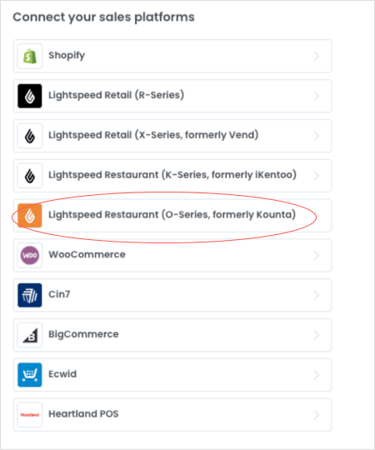
OR from the POS & integrations page
1. Click Connect sales platform

2. Next to Lightspeed Restaurant (O-Series) POS , click Connect
-1.png?width=297&height=450&name=Group+1+(27)-1.png)
3. After clicking connect from either method, you will asked to authorize the connection between Marsello and Lightspeed Restaurant (O-Series) POS. Ensure all toggles are ON, and then click Authorize Application.
📝 Note: If you are not already logged in, you will be prompted to log in to your Lightspeed Restaurant (O-Series) POS account.
+1-1.png?width=545&height=300&name=Screenshot+(490)+1-1.png)
4. This will form the connection between Lightspeed Restaurant (O-Series) POS and Marsello. Your orders and customers will now begin to sync through to your Marsello account 🎉
Lightspeed Restaurant (O-Series) POS will now display in your Marsello app admin under the Integrations page; including any POS and eCommerce sites listed on your Lightspeed account.

Brands also searched for: kiosk, kkount, kkount, kkou